
Welcome to the course Using Data to provide Personalized Student Support. In this course we will explore the connection between the data captured in learning experiences, and its processing, analysis and use to produce personalized student support actions (in this case, learner feedback). The context is a learning experience for which a rich data set is obtained. The data must first be manipulated to derive insights, and then transformed into actions that are regularly offered to students while the learning experience is being delivered.
Technology mediation is very common in an increasing number of learning experiences. This mediation typically provides detailed data sets with information about the interactions occurring in the learning environment. This data has the potential to provide a very detailed description of how learners engage in a learning experience, how they communicate with each other, and the learning strategies they adopt.
But data alone is not enough to gain insight into these aspects, or to guide intervention or feedback that will support better learning. The data must first be analyzed and interpreted in the highly-situated context of a learning experience. Moreover, the processes of data generation, analysis and interpretation may be reciprocal and iterative: the analytic methods applied to the data must take into account the structure of a learning experience (ie the learning design), but the learning design itself may be heavily influenced by the need or intention to collect and analyze relevant data.
In this course, we will explore this reciprocal relationship and provide you with sample data that showcases the steps required to establish the connection between data generation/analysis and learning design. Moreover, as a guided use case, we will experiment with the OnTask platform to harnessing data insights and generate feedback interventions to guide and support the learner experience.
Objectives
- Describe how learning analytics can support the design and deployment of a learning experience.
- Interpret the data collected in a learning experience with respect to its original intent.
- Examine data sets to produce insights about how students are engaging in the learning environment.
- Use OnTask to make effective use of learner activity to construct a set of personalized feedback actions that can be delivered as part of a learning experience.
Meet the Instructors
- Abelardo Pardo, Professor and Dean Academic, Division of Information Technology, Engineering and the Environment, University of South Australia, Adelaide, Australia.
- Leah Macfadyen, Associate Director & Instructor, Master of Educational Technology Program, Instructor, Dept. of Language & Literacy Education, The University of British Columbia, Vancouver, Canada.
Instructor and TA Roles
This course will involve several teaching assistants (TAs) who will monitor the course. They will try to respond to concerns and questions as they can. Due to the large number of participants enrolled, they may not be able to get to each question immediately and we ask for your patience. The TAs will bring all issues that the instructors need to know to their attention and the instructors will also participate in supporting student needs and grading.
New to edX
If you are new to the edX platform, please take some time to go through the DemoX Course to become familiar with the edX system. To get started with the course at any time, click on the "Course" tab at the top of the page. To get help with a technical problem in edX, click Help to send a message to edX Student Support. To get help with general course content or working with R, use the Course Help tab. Due to the high number of students enrolled, your instructors may not be able to reply to individual emails or social media posts, so please use this tab to ensure that any issue or question is properly addressed.
Course Scenario
You are leading a teaching and learning support team in a university that is interested in improving the overall quality of the student experience. You are aware of certain data that is collected in different units within the institution. The data is not readily available to be used to gain insight and provide support to instructors, it requires some additional processing. Your objective is to design a process to support instructors to use data obtained in almost real time to provide students with personalized learning support actions. Your team must:
- Identify the institutional data sources that might offer useful insights about student learning or progress, and might be leveraged to improve the teaching and learning process.
- Facilitate access to these data sources and identify meaningful connections between selected data points and the corresponding learning designs.
- Support instructors to embrace the use of data to support their decision making processes during the delivery of a learning experience.
- Promote a culture of data-literacy and awareness among instructors and use it to target improvements in the overall quality of the student experience.
A sample learning design and associated data
This figure below offers a schematic illustration of a sample learning design: what Lockyer et al. (2013) explain as:
...the sequence of learning tasks, resources and support that a teacher constructs for students over part of, or the entire, academic semester (p. 3).
As these authors explain:
...the challenge posed by learning analytics is interpreting the resulting data against the pedagogical intent and the local context to evaluate the success or otherwise of a particular learning activity (p. 2)
In this course, we are sharing with you some sample data sets generated by tools and systems supporting this sample learning design.
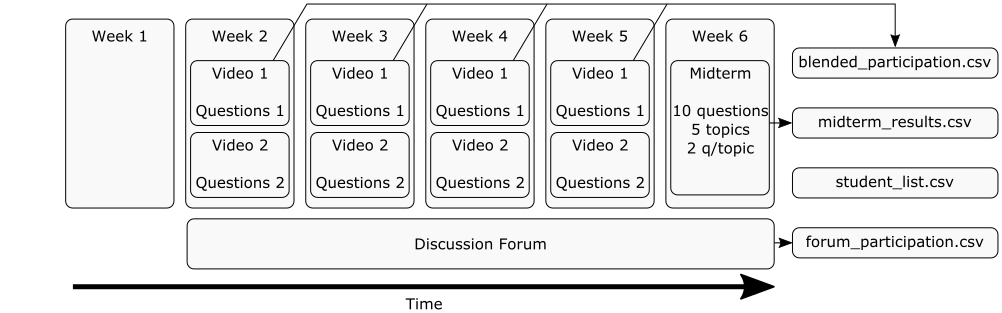
This sample course offers learning activities each week, and in our scenario, we find ourselves at the end of Week 6. During week 1 nothing happened that generated potential analytics for our use. In weeks 2-5 the learning design required students to:
- Watch two videos
- Answer questions about the content of the videos
- Participate in a discussion forum.
In Week 6 a midterm examination was held to assess student understanding of the material. The exam contained 10 questions about 2 topics (first 2 questions about first topic, second 2 questions about second topic, and so on). There are five data files (the dataset) obtained from this scenario:
- A file with information about the students (name, type of enrollment, etc.)
- A file with the data about their participation in the discussion forum (divided in weeks)
- A file with the engagement data with the blended elements (videos and questions)
- A file with the results obtained in the midterm examination.
You will have time to explore these datasets as part of the activities and discussions in this course. This sample learning design is intended to be generic enough to accommodate your personal preferences and interests, but at the same time concrete enough to frame fairly specific activities.
Target Audience
In our experience, the institutional audience needed to understand, manage and effectively make use of learning data effectively requires and includes individuals with a variety of roles skills. We expect the learners enrolled in this course to reflect this variety. For this reason, we have assumed the following three rough areas of expertise:
- Highly Technical (HT)
Computer scientist or learners with background in programming. You know how to write programs, scripts, and some basic data processing. You may have some knowledge of data science, but your expertise is mainly in programming. You might have some awareness of how to deploy data science applications but you are not fully aware of the requirements in the area of learning design or effective teaching and learning techniques. - Data Scientists (DS)
You have a strong background in statistics and in handling statistics packages. You may know some basic programming for manipulation of data sets, invocation of libraries to perform regression, clustering, etc. You have only made vague connections (if any) between data science and learning design. - Educational Designers and Instructors (ED)
You belong to this group if you have a strong pedagogical background, and your expertise is in design and deployment of courses, activities, tasks, or other learning experiences. You are aware of the existence of data but you are not expert in programming or data science.
The material in this course has been divided into three streams, one for each of these domains of expertise. The streams propose tasks each week that focus on elements of the exploration and use of data to support learners, but with options aligned with each group’s domains of knowledge. We strongly encourage you to first identify which one of these three streams is the one that more accurately defines your domain of expertise, and then start considering the activities for such stream. If you don’t identify yourself with any of these three profiles, check the first activity for each of them and see which one you think is more aligned with your preferences.
Regardless of your area of expertise, the tasks for all three streams will be available to all students. There is no mechanism on the platform to prevent anybody from viewing and/or interacting with the tasks in another stream. We are keen to offer you the freedom to explore across domain areas, and you are welcome to also work on the tasks from other streams. At the same time you should be aware that some of the tasks may be beyond your level of expertise. You are of course welcome to simply ignore these tasks and focus on the activities in your own stream.
Spaces to Explore in the Course
This course is about exploring how to connect data with the improvement of a learning design and its deployment. We have identified three areas for this exploration and the activities for all streams are located in these three spaces chronologically (one per week):
- Week 1: The Space of Logs (L)
In this space you will become aware of the kind of logs that exist and the type of information that is being captured by machines (for example, eLearning tools and platforms). The ‘log space’ also includes also applications such as SIS (Student information systems), survey systems that ask students to self-report at different stages, etc. You will become aware of the wide variety of data sources and the challenges of data integration. - Week 2: The Space of Data Analysis (DA)
In this space you will connect the information from the log space with tools that allow us to read, manipulate, and get insight from the data. These insights can range in complexity and this range can be very useful to provide activities for the three user groups identified as target audience (HT, DS, and ED). - Week 3: The Space of actions (A)
In this space you will connect the insights obtained in the data analysis space with specific actions focused on a defined aspect of the learning design, a purpose, a target audience, and an objective. Here, you can use OnTask yourselves to explore such connections and investigate effective ways of using the data.
You will move through these three spaces sequentially as they cover the relevant elements of the use of data to provide student support.
Choose Your Own Course Path
The combination of the three expertise groups and the spaces to explore within the course has led to the creation of three parallel tracks within the course (one for HT, another for DS, and the third for ED). The activities in each track are connected with the three spaces and therefore explore the logs, data analysis procedures and actions. We encourage you to choose the one you think is more adequate to your profile but at the same time, the rest of activities are available for you to explore and contrast.
|
Space/Audience |
HT |
DS |
ED |
|
Week 1: |
Use of programming scripts to process log files |
Describe data sources, categorise type of information. Define collection of events and identify which indicators can be extracted. |
Explore sample educational data sets and their elements. Investigate institutional data (sources, attributes, utility, ownership, storage). |
|
Week 2: |
Automate a set of scripts to feed data to a statistical package to produce models and/or visualizations. |
Design scripts for model creation. |
Learn about predictive analytic models relevant to evaluation of learning design. Review a framework that connects learning analytics to learning design; use it to analyze a sample learning design, and map elements of design to potentially valuable analytics. |
|
Week 3: |
Manipulate elements in OnTask using the API. |
Explore the connection between models and how they would be used in real learning experience. |
Learn how to use OnTask. Use OnTask to analyze the results of a summative assessment (a ‘checkpoint analytic’) element in a learning design and create a personalized feedback messages to students. Use OnTask to analyze forum participation data (‘process analytics’) in a learning design and create a personalized feedback messages to students. |
Grading Policy
For those of you that signed up for to receive the official course certificate, you need submit one artifact per week from the following table in order to obtain the certificate:
|
Space/Audience |
HT |
DS |
ED |
|
Week 1: |
Script to process and translate the events recorded by the browser into a CSV file with accumulated values. |
Document describing the data sources you envision to exist in an educational institution. |
Document containing a list of data sources that should be available in an educational institution. |
|
Week 2: |
R script to merge multiple data frames from various sources. |
1 page document describing in detail a scenario in your institution (or a hypothetical institution) in which a clustering algorithm may be needed. |
Submit the table or figure created as a result of the work plan. |
|
Week 3: |
Script that connects to the OnTask API and uploads one CSV and merges a second one. |
Document with screen captures showing how the process to create the action and the conditions in OnTask. |
Document with screen captures showing how you created the action and the conditions (the captures also have to show the upper right corner with your login) followed by text explaining the steps. Include a short text (maximum 1 page) proposing two other contexts. |
You may change “streams” (HT, DS or ED) from week to week, but you can only submit one item per week.
All assignments to be graded are due on Sunday at 11:00 PM UTC the week that they are assigned:
- Week 1 Assignments: Sunday, August 26, 2018 @ 11:00 PM UTC
- Week 2 Assignments: Sunday, September 2, 2018 @ 11:00 PM UTC
- Week 3 Assignments: Sunday, September 9, 2018 @ 11:00 PM UTC
If you are seeking certification, you will need to score a grade of 70% of more to pass this course and receive a certificate.
Academic Policy
You are expected to undertake your own original work in this course. Feel free to be inspired by other participants and resources, but make sure that you are doing your own work if you are working towards a certificate. Any direct copying, plagiarism, or breaching of academic integrity of any kind on any assignment is subject to an automatic "0" in the course, for those that are seeking certificates.
Code of Conduct
All course participants are required to agree with the following code of conduct. Instructors and participants will enforce this code throughout the course. We are expecting cooperation from all participants to help ensuring a safe environment for everybody.
Our course is dedicated to providing a harassment-free experience for everyone, regardless of gender, age, sexual orientation, disability, physical appearance, body size, race, or religion (or lack thereof). We do not tolerate harassment of participants in any form. Sexual language and imagery is not appropriate for any venue, including discussion boards, blogs, Twitter and other online media. Course participants violating these rules may be sanctioned or expelled from the course at the discretion of the instructors. Harassment includes offensive verbal comments related to gender, age, sexual orientation, disability, physical appearance, body size, race, religion, sexual images in public spaces, deliberate intimidation, stalking, following, harassing photography or recording, sustained disruption of talks or other events, inappropriate physical contact, and unwelcome sexual attention. Participants asked to stop any harassing behavior are expected to comply immediately. If a participant engages in harassing behavior, the instructors or other participants may take any action they deem appropriate, including warning the offender or expulsion from the course. If you are being harassed yourself, or notice that someone else is being harassed, or have any other concerns, please contact an instructor or TA immediately. Instructors will be happy to help participants assist those experiencing harassment to feel safe for the duration of the course. We value your participation.